Weather CoverUpdated 3 months ago
First 5 minutes
New to the Weather Cover? Here's the fastest path from box to covered.
Basket cover, storage pouch, and cleaning can be found below.
Safety warnings
+−
Warning
Never leave your child unattended.
Failure to follow these warnings and instructions could result in serious injury or death.
Before and during use
- Ensure that all the locking devices are engaged before use.
- To avoid injury, ensure that your child is kept away when unfolding and folding this product.
- Check that the pram body, seat unit, or car seat attachment devices are correctly engaged before use.
- Always use the restraint system.
Keep your child safe
- Do not let your child play with this product.
- Suffocation hazard. Do not allow your child to play with the weather cover.
- This product is not suitable for running or skating.
What's in the box
+−
- Weather Cover
- Basket cover
- Storage pouch
Designed to fit the Veer Cruiser.
Using the weather cover
+−
Follow these steps to install the weather cover on your Cruiser, set it up for one or two canopies, and add the basket cover.
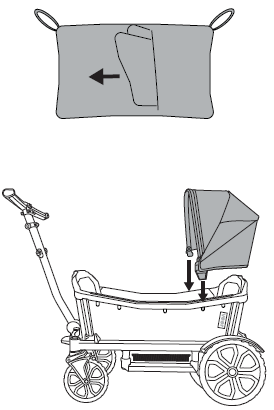
Remove from storage pouch
Take the weather cover out of its storage pouch and install your retractable canopy.
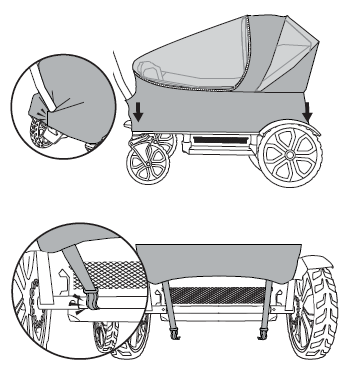
Slip the cover over the Cruiser
Slip the cover over the Cruiser and secure it around the handle.
Snap the rear cover hooks over the rear axle.
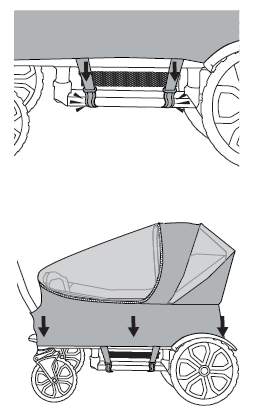
Connect the side hooks
Connect the side hooks to the footwell bottom.
Adjust the fit so the cover sits snugly.
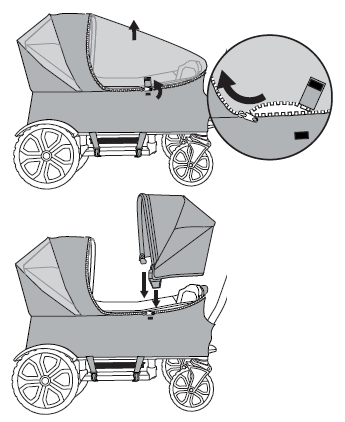
To use with two canopies
Unzip and remove the shield.
Install the second canopy and secure the seat.
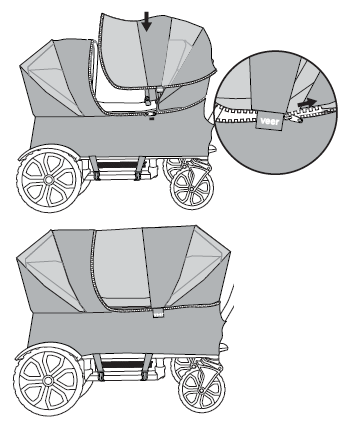
Zip in the canopy bridge
Align the Velcro on the logo hang tag of the canopy bridge with the Velcro on the cover.
Zip in the canopy bridge and secure the Velcro tab.
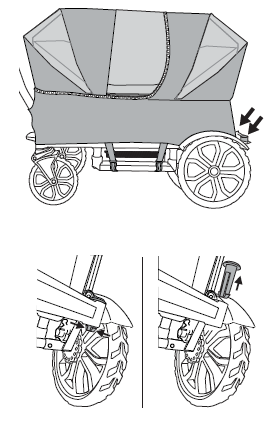
To use the basket cover: remove port plugs
Remove the port plugs to prepare for the basket cover.
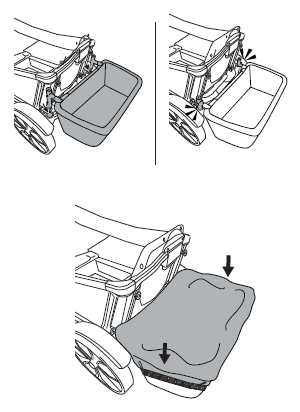
Attach the foldable storage basket
Attach the foldable storage basket.
Slide the basket cover over the foldable storage basket.
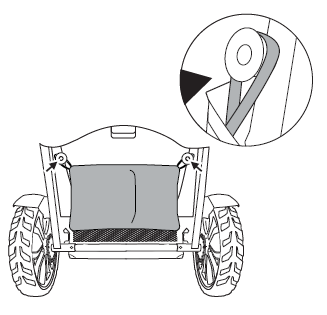
Attach the storage pouch
Attach the storage pouch to the rear of the Cruiser.
Cleaning & general maintenance
+−
How to clean
Rinse thoroughly with clean water, or hand wash with cold water and mild detergent.
Do not tumble dry, bleach, iron, or dry clean.
Allow to completely air dry.
Limited warranty
+−
We've got you covered
This accessory is guaranteed to be free from any manufacturing defects for a period of 1 year from the date of purchase under normal use and in compliance with the operating instructions.
This warranty is not transferable and extends only to the original retail purchaser, and is only valid when supplied with proof of purchase.
Please retain proof of purchase for this limited warranty.
Coverage details
The warranty is valid only in the original country of purchase and is subject to the conditions set out by that country. Conditions may vary. Veer will not ship replacement or repair parts out of the country of purchase.
Veer will provide replacement parts or conduct repairs if deemed appropriate by the company. Veer reserves the right to exchange an item for a replacement part. Some parts may be replaced with newer model parts as the Cruiser is improved over time.
What's not covered
A repair issue will not be covered by this warranty if:
- The issue is caused by misuse or improper / poor maintenance. Please refer to this instruction booklet for guidance on use and maintenance.
- Damage is caused by improper installation of Veer parts and/or accessories.
- Damage is corrosion, mold, or rust caused by a lack of maintenance or service.
- Damage is due to general wear and tear from everyday use or negligence.
- Damage is caused by sun intensity, sweat, detergents, damp storage, or frequent washing.
- Repairs or modifications are carried out by a third party.
- The product is purchased from an unauthorized retailer. Approved retailers are listed at goveer.com.
- The product is second-hand.
- The product is damaged as a result of an accident, airline, or freight damage.
Veer reserves the right to determine whether the terms and conditions of the warranty have been met. For full warranty details, visit goveer.com.
Need help? Email [email protected].