Maxi-Cosi, Nuna, Clek & Cybex Infant Car Seat Adapter for Veer Switchback SystemUpdated 2 months ago
First 10 minutes
New to the Maxi-Cosi, Nuna, Clek & Cybex Infant Car Seat Adapter? Here's all you need for a safe first installation.
Steps 7–12 (double mode with Switchback Seat, double mode with two car seats, and removal) are covered in the full section below.
Safety warnings
+−
Never leave children unattended. Failure to follow these warnings and instructions could result in serious injury or death.
- Ensure that all the locking devices on &Roll stroller or &Jog jogging frame are engaged before use.
- To avoid injury, ensure that your child is kept away when unfolding and folding this product.
- Do not let your child play with this product.
- Always use the restraint system.
- Check that the pram body, seat unit, or car seat attachment devices are correctly engaged before use.
- This product is not suitable for running or skating.
- Never use the infant car seat adapter as a handle to lift the &Roll stroller or &Jog jogging frame.
- Never place an infant car seat into this car seat adapter before you have firmly attached this car seat adapter to the &Roll stroller or &Jog jogging frame.
- Always verify the adapter is correctly installed onto the &Roll stroller or &Jog jogging frame before installing an infant car seat.
- Weight limitations: recommended only for infants within the height and weight limits of infant car seats specified in the infant car seat manual.
- Always use the infant car seat restraint system as recommended by the manufacturer.
- Never use this product if there are any missing or broken parts. Contact Veer for replacement parts and never use substitute parts.
- The &Roll stroller or &Jog jogging frame with an infant seat attached does not replace a cot or a bed. Should your child need to sleep, place them in a suitable pram body, cot, or bed.
Maxi-Cosi, Nuna, Clek & Cybex Infant Car Seat Adapter Overview
+−
About this adapter
This adapter is intended for use with Maxi-Cosi, Nuna, Clek & Cybex Infant Car Seats on the Veer &Roll or &Jog frames. The compatible models are listed below. For the full infant car seat compatibility guide, see the Infant Car Seat Compatibility Guide.
Compatible car seat models
The following infant car seats have been tested and approved for use with this adapter on the Veer &Roll and &Jog frames. Updated November 2024.
Nuna
- PIPA aire RX
- PIPA lite lx
- PIPA lite
- PIPA RX
- PIPA
Maxi-Cosi
- Mico Max 30
- Mico 30
- Nxt
- Mico AP
Cybex
- Aton Q & M
Clek
- Liing
Britax
- Cyprus
- Willow
- Willow S
- Willow SC
Not compatible with: Stokke PIPA by Nuna or Cybex Cloud Q.
Canada only: Two Cybex infant car seats cannot be used simultaneously in double mode.
Using your Maxi-Cosi, Nuna, Clek & Cybex Infant Car Seat Adapter
+−
Select a mode below for step-by-step installation instructions. Always secure the stroller frame before beginning.
Single Mode — &Roll and &Jog
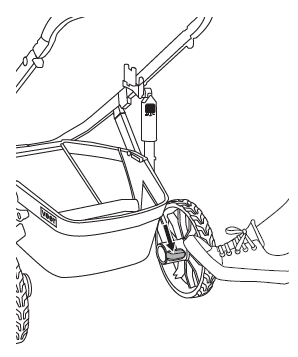
Secure the &Roll stroller frame
Press gently on the brake pedal to secure the stroller frame before installation.
Green indicator = unlocked. Red = locked.
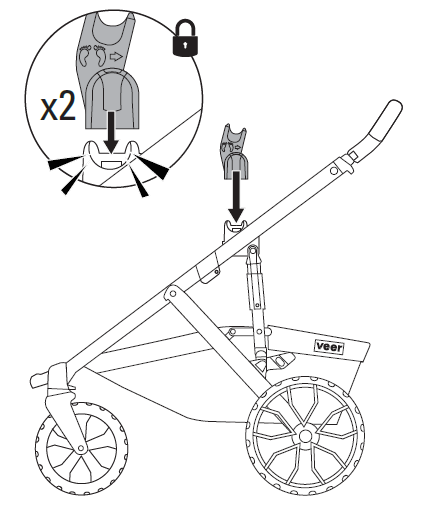
Attach ICS adapters to frame
Attach infant car seat adapters to the &Roll stroller frame or &Jog jogger frame, with the gray dot facing the back. Press until it clicks in place.
Listen for audible click. Pull up on adapters to confirm secure connection. Green = locked.
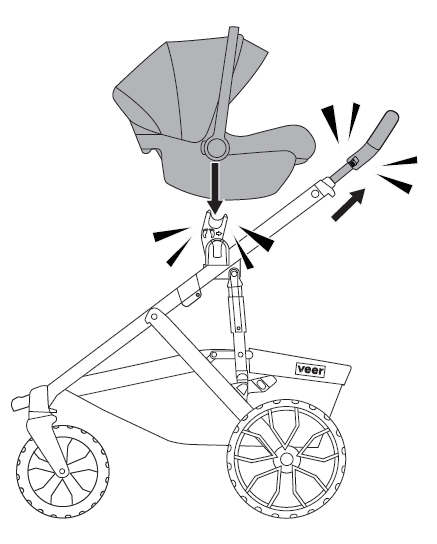
Attach car seat (single mode)
Maxi-Cosi, Nuna, Cybex & Clek: Press the height adjuster buttons to lift the handle to its highest position.
Attach the infant car seat in a rear-facing position until the car seat clicks in place.
Listen for audible click. Pull on car seat handle to confirm secure connection.
Double Mode — with Switchback Seat
Secure the &Roll stroller frame
Press gently on the brake pedal to secure the stroller frame before installation.
Green indicator = unlocked. Red = locked.
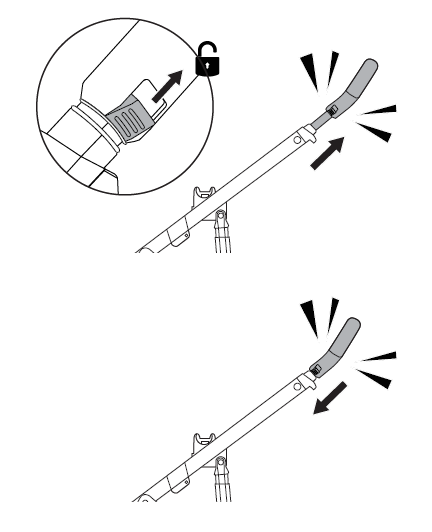
Double mode preparation — handle position
Maxi-Cosi & Nuna: Press the height adjuster buttons to lift the handle to its highest position.
Cybex (not compatible with Cloud Q) & Clek: Put the handle at its lowest position.
Important: Complete this step before installing the infant car seat on the stroller.
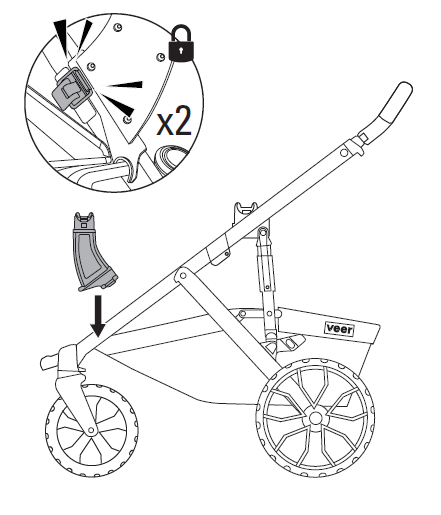
Attach lower post adapters
Attach lower post adapters (sold separately) to your &Roll stroller frame and flip the latch to close.
Listen for audible click. Pull up on adapters to confirm secure connection.
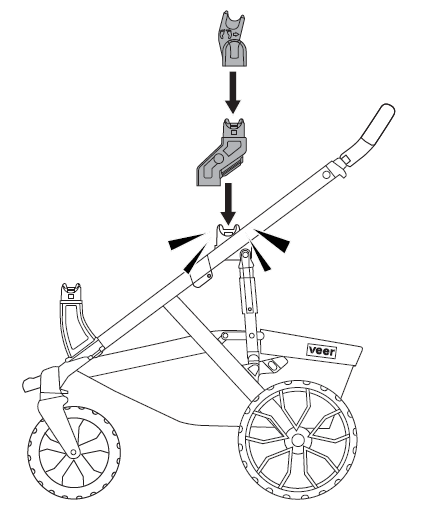
Attach upper riser adapters
Attach upper riser adapters (sold separately) to the &Roll stroller frame and press until they click in place. Attach the Maxi-Cosi, Nuna, or Cybex infant car seat adapters to the upper riser adapters (sold separately).
Listen for audible click. Pull up to confirm secure connection.
Maxi-Cosi & Nuna: Fully extend the &Roll stroller handle. Cybex (not compatible with Cloud Q) & Clek: Fully compress the &Roll stroller handle.
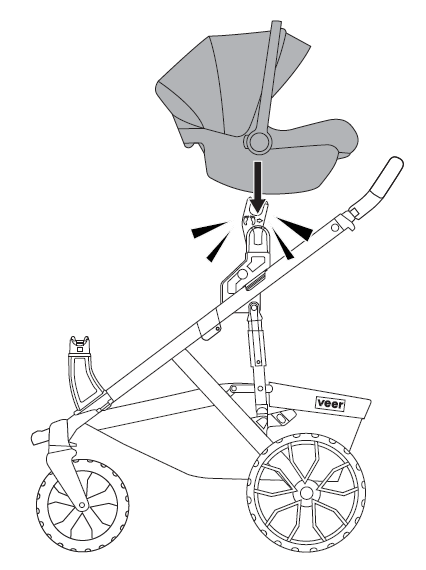
Attach car seat to upper risers
Attach the Maxi-Cosi, Nuna, or Cybex infant car seat to the upper risers in a rear-facing position until it clicks in place.
Listen for audible click. Pull on car seat handle to confirm secure connection.
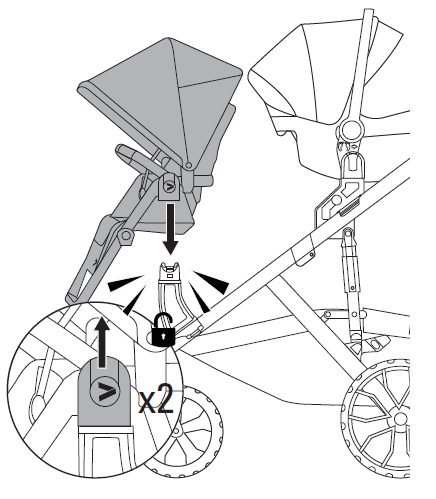
Lower Switchback Seat into post adapters
Lower the Switchback Seat into the lower post adapters until it clicks into place.
Listen for audible click. Pull up to confirm secure connection.
To remove: press seat hub buttons to release, then lift to remove.
Double Mode — with Two Car Seats
Secure the &Roll stroller frame
Press gently on the brake pedal to secure the stroller frame before installation.
Green indicator = unlocked. Red = locked.
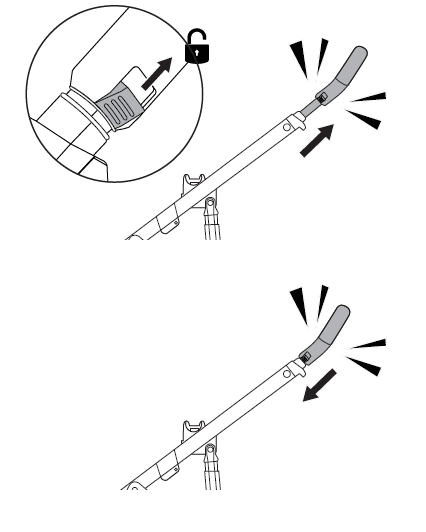
Double mode preparation — handle position
Maxi-Cosi & Nuna: Press the height adjuster buttons to lift the handle to its highest position.
Cybex (not compatible with Cloud Q) & Clek: Put the handle at its lowest position.
Important: Complete this step before installing the infant car seat on the stroller.
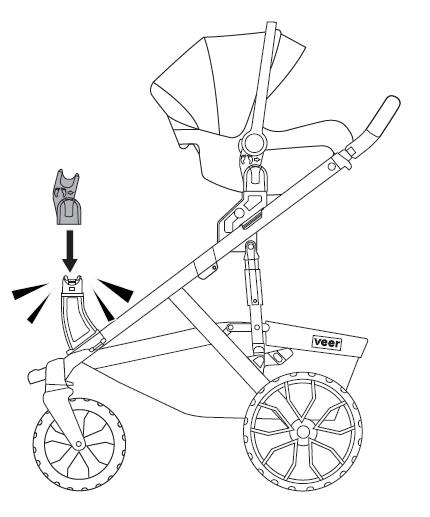
Attach second set of ICS adapters
Attach a second set of Maxi-Cosi, Nuna, or Cybex infant car seat adapters to the &Roll stroller frame, with the arrow facing the back. Press until the adapters click in place.
Listen for audible click. Pull up to confirm secure connection. Green = locked.
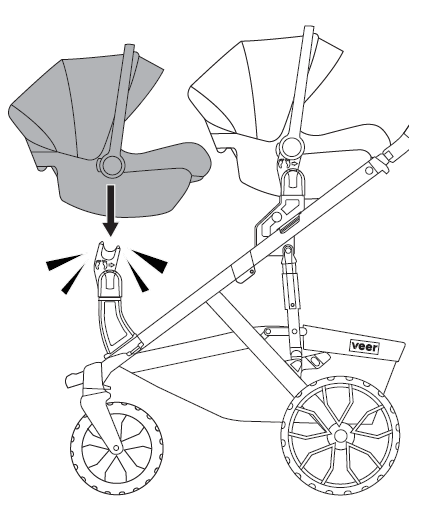
Attach second car seat
Attach a second Maxi-Cosi, Nuna, or Cybex infant car seat to the lower post adapters in a rear-facing position until it clicks in place.
Listen for audible click. Pull on car seat handle to confirm secure connection.
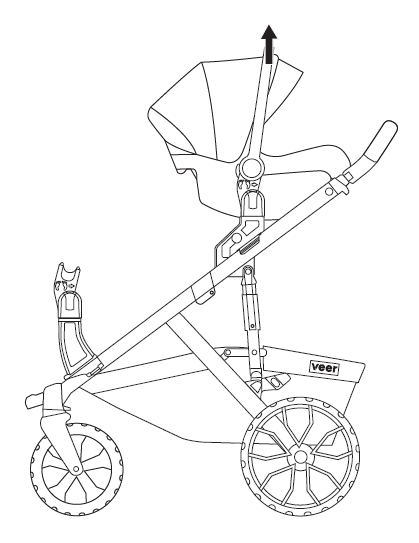
Remove Maxi-Cosi, Nuna, or Cybex infant car seat
Press on either side of the upper risers to release, then lift to remove.
Cleaning & maintenance
+−
Routine cleaning
Wipe with a damp cloth and dry thoroughly. For a more thorough cleaning, rinse with a hose or hand wash with a mild detergent and dry thoroughly.
Do not use abrasives. Do not put in dishwasher.
Safety & warranty
+−
We've got you covered
This accessory is guaranteed to be free from any manufacturing defects for a period of 1 year from the date of purchase under normal use and in compliance with the operating instructions.
This warranty is not transferable and extends only to the original retail purchaser and is only valid when supplied with proof of purchase.
Please retain proof of purchase to activate this limited warranty.
The warranty is valid only in the original country of purchase and is subject to the conditions set out by the country in which the items were purchased. Conditions may vary. Veer will not ship replacement or repair parts out of the country of purchase.
Veer will provide replacement parts or conduct repairs if deemed appropriate by the company. Veer reserves the right to exchange an item for a replacement part. Some parts may be replaced with newer model parts as Switchback is improved over time.
What's not covered
A repair issue will not be covered by this warranty if:
- The issue is caused by misuse or improper/poor maintenance.
- Damage is corrosion, mold, or rust caused by a lack of maintenance or service.
- Damage is due to general wear and tear resulting from everyday use or negligence.
- Damage is caused by the intensity of the sun, sweat, detergents, damp storage, or frequent washing.
- Repairs or modifications are carried out by a third party.
- This Switchback accessory is purchased from an unauthorized retailer. Approved retailers are listed at goveer.com.
- This Switchback accessory is second-hand.
- This Switchback accessory is damaged as a result of an accident, airline, or freight damage.
Veer reserves the right to determine whether or not the terms and conditions of the warranty have been met. Please contact Veer with any warranty questions.
For full warranty details, visit goveer.com
Contact & support
Phone: 470-344-3200 · Email: [email protected]