Family BasecampUpdated 3 months ago
First 10 minutes
New to the Family Basecamp? Here's the fastest path from bag to basecamp.
Storing, cleaning, and long-term care are covered in the sections below.
Safety Warnings
+−
This tent meets the flammability requirements of CPAI-84. This tent is made of flame-resistant fabric. It is not fireproof. The fabric will burn if left in continuous contact with a flame source. The application of any foreign substance to the tent fabric may render the flame-resistant properties ineffective.
Safe use
- The product must be fully erected prior to use.
- Do not use this product outdoors if high winds are present or threat of high winds exists.
- Do not use Infant Car Seat Adapter when Family Basecamp is attached to side of Cruiser.
What's in the box
+−
- Family Basecamp
- Standard Floor Mat (Sand Mat sold separately)
- Storage Bag
- Shoulder Strap
- Tent Stakes (8)
Setting up your Family Basecamp
+−
Follow these steps to set up your Family Basecamp. Always ensure the product is fully erected before use, and avoid using outdoors in high winds.
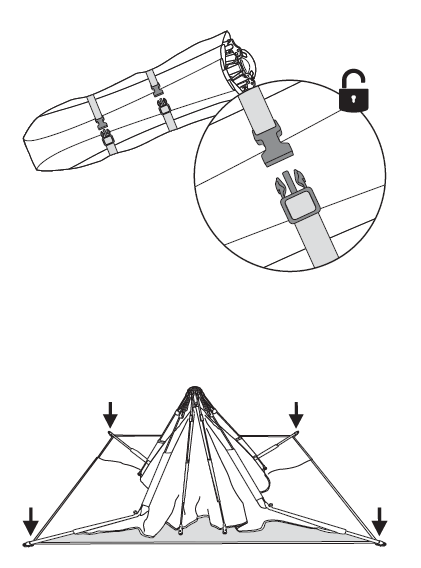
Remove from storage bag
Remove from storage bag and unclip binding straps.
Stand folded tent upright and allow lower feet to fall to the ground.
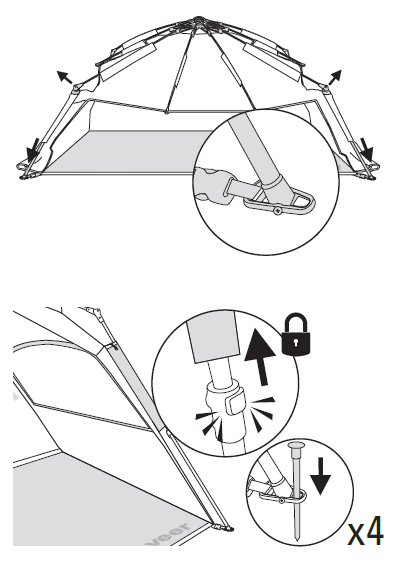
Extend legs & stake corners
Make sure four feet are flat on the ground, then bend out legs.
Fully extend front legs until they click and place stakes in all corners.
✓ All four legs fully extended and clicked into place.
Hub not locking? The locking mechanism won't engage if the support poles aren't fully extended. Double-check that all front legs are clicked out completely, that the floor mat isn't bunched or tangled underneath, then press firmly down on the hub.
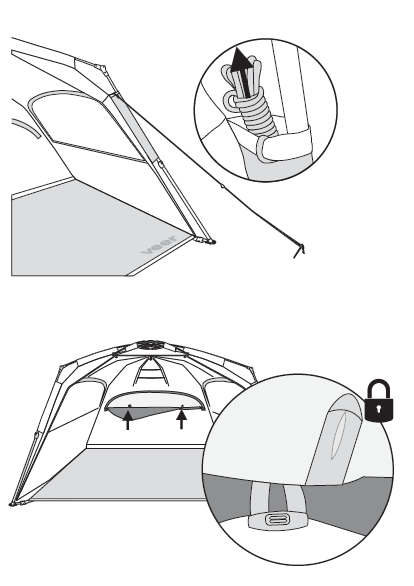
Secure wind anchors & open up
For extra stability, loop wind anchor cords (stored in leg pole sleeve pockets) around stakes.
Close windows or open windows as preferred.
Optional: Install optional sand mat.
Storing your Family Basecamp
+−
Always air dry the tent completely before placing in the storage bag. Do not stow while wet.
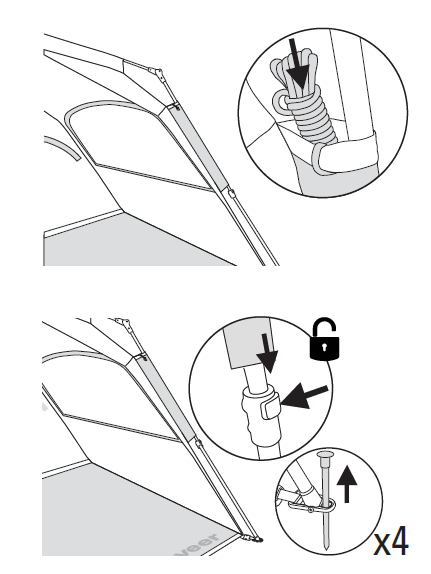
Prep for storage
Before storing, shake sand or debris off all surfaces and close windows.
Remove wind anchor stakes and store wind anchor cords in leg pole sleeve pockets.
Remove corner stakes and collapse front legs.
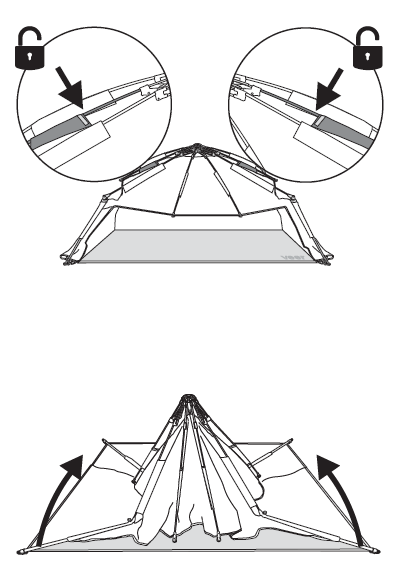
Collapse the tent
Compress arms with yellow trim inward to collapse tent.
As tent collapses, gather legs and pull feet up toward center hub, then roll tent up.
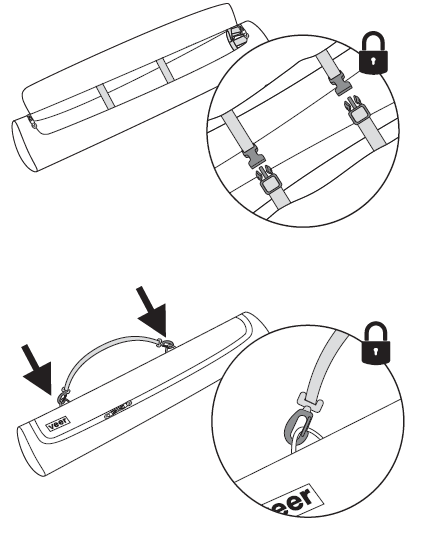
Pack in storage bag
Attach binding straps and place in storage bag.
Attach shoulder strap to storage bag for portability.
Optional: Attach to your Cruiser for easy transport. Do not use Infant Car Seat Adapter when Family Basecamp is attached to side of Cruiser.
Cleaning & maintenance
+−
Routine cleaning
Do not use abrasives. Wipe with a damp cloth.
Air dry completely before placing in storage bag. Do not stow while wet.
Limited warranty
+−
We've got you covered
Your Family Basecamp is guaranteed to be free from any manufacturing defects for a period of 1 year from the date of purchase under normal use and in compliance with the operating instructions.
This warranty is not transferable and extends only to the original retail purchaser and is only valid when supplied with proof of purchase.
Please retain proof of purchase to activate this limited warranty.
Coverage details
The warranty is valid only in the original country of purchase and is subject to the conditions set out by the country in which the items were purchased. Conditions may vary. Veer will not ship replacement or repair parts out of the country of purchase.
Veer will provide replacement parts or conduct repairs if deemed appropriate by the company. Veer reserves the right to exchange an item for a replacement part. Some parts may be replaced with newer model parts as the Family Basecamp is improved over time.
For full warranty details, visit goveer.com.