Cruiser CityUpdated 2 months ago
First 10 minutes
New to the Cruiser City? Here's the fastest path from box to adventure.
Setting the foot brake, adjusting the harness, telescopic handle, push/pull modes, folding, and wheel removal are covered separately below.
Safety warnings
+−
Never leave children unattended. Failure to follow these warnings and instructions could result in serious injury or death. Read instruction manual before use.
Age & weight limits
- This seat unit is not suitable for children under 6 months.
- The Veer Cruiser City seats up to two children from 6 months to 25 kg (55 lbs) and a maximum height of 114 cm (45 in) each — 100 kg (220 lbs) total.
- The Cruiser City is suitable from birth with the optional Veer infant car seat adapter and a user-supplied car seat.
- Use a harness as soon as your child can sit unaided.
Safe use
- Always use the restraint system.
- To avoid serious injury from falling or sliding out, passengers must always be seated while the Cruiser City is in use and should always use the complete 3-point harness.
- To prevent injury, children must remain seated with their arms and legs inside the Cruiser City while riding.
- This product is not suitable for running or skating.
- Ensure that all locking devices are engaged before use.
- Always make sure the Cruiser City is fully open and locked before use.
- Check that the Cruiser City seat unit or car seat attachment devices are correctly engaged before use.
- Never park the Cruiser City on a hill with children inside.
- The brake must be locked while taking children in or out of the Cruiser City.
- Ascend curbs in pull mode. Do not attempt to push onto curbs.
- The Cruiser City should never be used while ascending or descending stairs, or using an escalator.
- Do not use the Cruiser City without rear wheel safety fenders in place and always keep hands away from moving wheels.
- Do not sit or stand on the side wall panels of the Cruiser City.
- Do not sit or stand on the folded seat backs of the Cruiser City.
Handling & accessories
- To avoid injury, ensure that your child is kept away when unfolding and folding this product.
- Always keep fingers away from moving parts when folding, unfolding, or adjusting the Cruiser City to prevent entrapment or pinching.
- Do not let your child play with this product.
- Do not make any alterations or modifications to the Cruiser City with products not supplied by the manufacturer, as this may cause instability or structural damage not covered under warranty.
- Unit may become unstable if the manufacturer's recommended load is exceeded, or if a parcel bag or an accessory other than that recommended by the manufacturer is used or hung from the unit.
- Lock brake before transporting in a car.
- Maximum carrying capacity of each side pocket is 0.9 kg (2 lbs).
- Maximum cup holder weight is 0.9 kg (2 lbs). Excessive weight may cause a hazardous, unstable condition. Do not place hot liquids in the holder.
- The cargo weight limit (without children) is 113 kg (250 lbs).
Standards compliance
This product is designed and manufactured to comply with ASTM F833 Standard Consumer Safety Performance Specification for Carriages and Strollers.
The Cruiser City overview
+−
The Cruiser City has been crafted with the finest workmanship and highest quality materials. Every innovative detail was intentionally designed to give you the highest performance, superior functionality, and an incredible ride!
Parts
- High Performance Rubber Handle Grips
- Telescoping Handle Bar Mechanism
- Removable Snack and Drink Tray
- One-Handed Seat Fold Down
- Safety Fenders
- Rugged Rear Wheels
- Accessory Mounts
- Accessory Wells with Plugs
- Foot Well and Drain
- Fabric Side Panels
- Front Swivel Wheels
- Removable Cup Holder
- Aluminum Frame
- Handle Lock
- Foot Brake
- 3-Point Seat Harness
- Removable Foot Well Insert
- Side Storage Pockets
Using your Cruiser City
+−
Follow these steps to set up and use your Cruiser City. Always ensure all locking devices are fully engaged before placing children in the wagon.
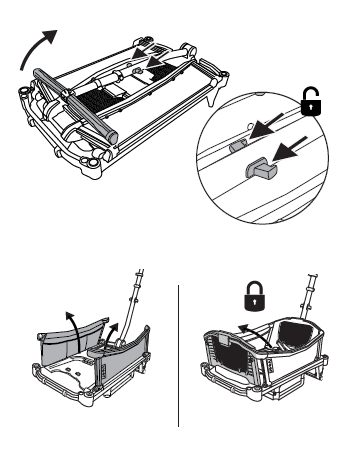
Open the Cruiser frame
Pull up on the handle release levers and swing the handle up to the locked position. Pull the side panels up followed by the front and seat backs into the locked position.
All panels should click firmly into their locked positions before use.
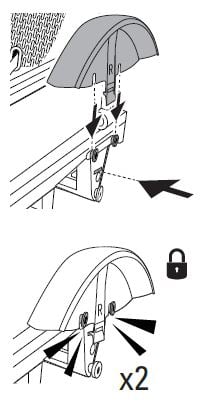
Install safety fenders
When looking at the Cruiser from the end opposite the handle, there is a left and right side. Fenders are coded "L" and "R".
Make sure the tab at the bottom of the fender locks securely in the open slot in the rear axle mount.
Do not use the Cruiser City without rear wheel safety fenders in place.
Before attaching, inspect each fender for cracks or stress marks around the mounting tab. A cracked fender should be replaced before use.
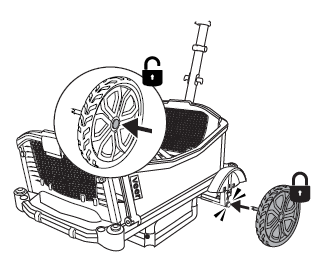
Install rear wheels
Make sure the wheel axle is inserted into the wheel. Press the button in the center of the wheel and slide it into the frame until you hear a click.
Check that each wheel is securely attached by pulling it away from the frame.
The wheel lock release button should press smoothly and spring back after each press. If it feels stiff, cracked, or fails to spring back, contact Veer support before forcing it — a damaged button can make wheel removal difficult and is covered under warranty.
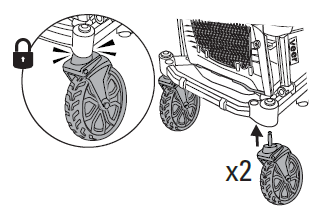
Install front swivel wheels
Attach the front wheels until you hear a click.
Give each wheel a gentle tug to confirm it is securely locked in place.
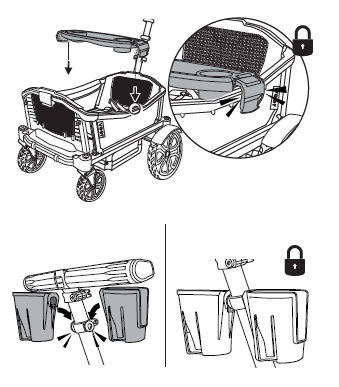
Install tray & cup holders
The tray must be centrally located on the side wall rail. Locate the center pin under the frame of the right and left sidewall rails.
Rest the tray above those pins and push the sides of the tray to clamp it in place.
The tray should sit level and not shift when nudged side to side.
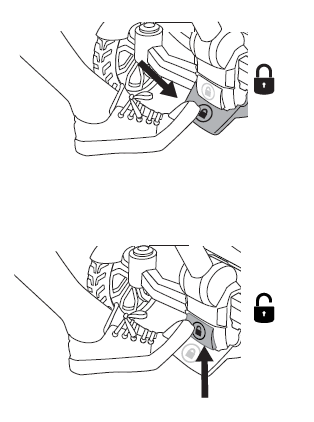
Set foot brake
To set the brake: Press gently until it clicks.
To release the brake: Gently kick the toe plate.
Always lock the brake before loading or unloading children.
Periodically check that the brake cable runs freely without fraying or kinks. If the brake does not hold firmly after being set, or the cable feels loose or damaged, stop use and contact Veer support at [email protected].
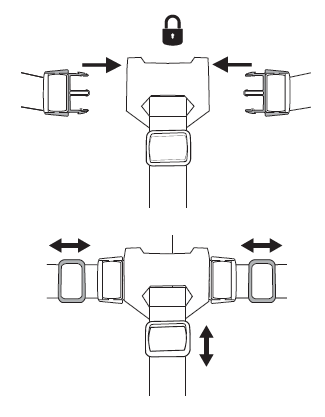
Adjust 3-point harness
Adjust the harness and shoulder straps to fit your child comfortably.
Always use the complete 3-point harness to prevent injury from falling or sliding out.
Before each use, run your fingers along all buckle hardware. Any sharp edges or metal burrs should be reported to Veer support immediately for a replacement buckle.
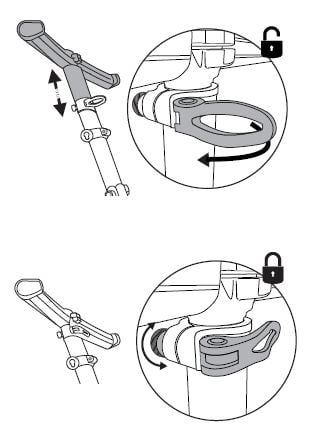
Adjust the telescopic handle
Unlock the handle to adjust the height, then lock it in place. Rotate the dial clockwise to increase lock tension if the handle shifts when pressure is applied.
The handle should feel firm at your chosen height — test it by applying forward pressure before loading children.
If the handle continues to slide down during use after re-tightening the dial, wipe any grit from around the collar joint and re-tighten. Persistent sliding that cannot be resolved this way is covered under the Veer limited warranty.
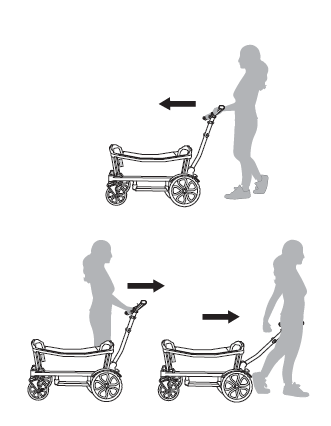
Use push mode or pull mode
Push mode: Lock the handle bar upright.
Pull mode: Lock the handle bar upright or unlock and drop the handle bar.
Ascend curbs in pull mode only. Do not attempt to push onto curbs.
Storing your Cruiser City
+−
Follow these steps to safely fold and store your Cruiser City.
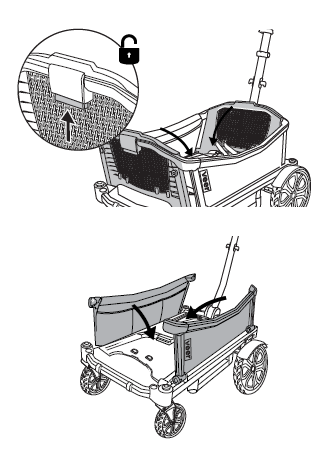
Fold seats & side panels
Remove all accessories. Lift the release button on the back of the front and rear seats and fold the seats down flat. Fold each side panel down until it lies flat.
Always keep fingers away from moving parts when folding to prevent pinching.
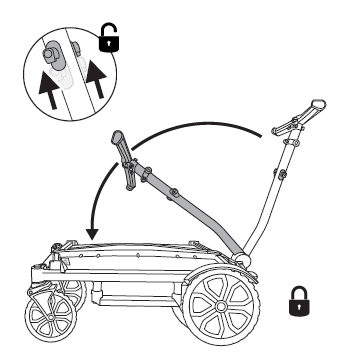
Fold the handle
Release the handle and lay it down until it locks.
The Cruiser City can be lifted and carried by holding its frame, or by the handle when in the down and locked position.
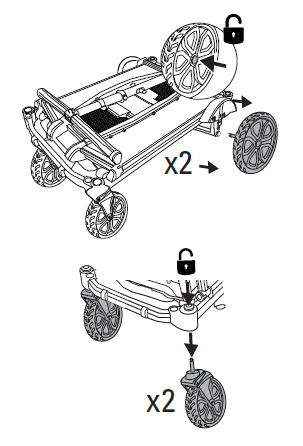
Remove wheels for compactness
Remove the wheels for ultimate compactness during storage or transport.
Ensure stability prior to leaving the Cruiser City unattended in its folded position.
Cleaning, maintenance & check-up
+−
Store the Cruiser City out of direct sunlight and environmental elements. If used outdoors, we recommend frequent cleaning.
The Cruiser City chassis
- If chassis parts have been exposed to salt water, thoroughly rinse with fresh (tap) water as soon as possible to avoid corrosion.
- If exposed to sand, use a soft brush to gently brush sand from the parts and cycle the components and brake until the sand is ejected and the components cycle freely.
- For an all-over wash, remove accessories and wheels and rinse with a hose. Allow wheels and accessories to completely air dry before reattaching.
- Never use a power washer on the Cruiser City.
Frame, seats, handle grips, fenders & wheels
Wipe with a damp cloth and a mild detergent and dry thoroughly. Do not use abrasives.
Soft-sided panels
Wipe with a damp cloth and a mild detergent and dry thoroughly. Do not use abrasives. Panels may also be removed for hand washing in cold water with mild detergent. Dry flat and away from direct sunlight before re-use or storage.
Do not bleach, iron, or dry clean.
Cargo basket
The fabric shell of the folding cargo basket can be unsnapped from the wire frame for a deeper clean. The rigid insert sewn into the base is not machine washable — wipe it with a damp cloth and mild detergent and allow it to air dry completely before reassembling.
Wash the fabric shell on a gentle cycle in cold water with mild detergent. Dry flat away from direct sunlight. Do not bleach or tumble dry.
Snack tray & cup holders
Wash in a sink or with a hose, or wipe with a damp cloth and mild detergent and dry thoroughly. Do not use abrasives.
Harness straps
Remove and hand wash in cold water with mild detergent. Dry flat and away from direct sunlight before re-use or storage.
Do not bleach, iron, or dry clean.
Time for a check-up
The Cruiser City requires routine user maintenance.
- Regularly check all connecting hardware (rivets, screws, etc.) for tightness and security. Inspect the brake, wheels, and tires and replace or repair as necessary.
- Wheels: Press each wheel lock release button and confirm it springs back freely. Pull each wheel away from the frame to verify the click-lock is holding. Replace any wheel that wobbles or whose button does not spring back.
- Brake cable: Visually inspect the cable for fraying or kinks. Confirm the brake holds firmly when set and releases cleanly when the toe plate is kicked.
- Telescopic handle: Tighten the tension dial and confirm the handle does not slide during use. Wipe grit from around the collar joint if needed.
- Fenders: Inspect for cracks or stress marks around the mounting tab. Replace before next use if damage is found.
- Check all safety devices, locks, and harnesses for correct and secure operation. Never continue to use a product that is structurally unsound.
- Only Veer replacement parts should be used. It may be unsafe to use parts supplied by another manufacturer.
- Contact customer service with any repair or maintenance questions at [email protected].
Limited warranty
+−
We've got you covered
The Cruiser City is guaranteed to be free from any manufacturing defects for a period of 2 years from the date of purchase under normal use and in compliance with the operating instructions.
This warranty is not transferable and extends only to the original retail purchaser and is only valid when supplied with proof of purchase.
Please retain proof of purchase for this limited warranty.
Coverage details
The warranty is valid only in the original country of purchase. This warranty is subject to the conditions set out by the country in which the items were purchased. Conditions may vary. Veer will not ship replacement or repair parts out of the country of purchase.
Veer will provide replacement parts or conduct repairs if deemed appropriate by the company. Veer reserves the right to exchange an item for a replacement part. Some parts may be replaced with newer model parts as the Cruiser City is improved over time.
For full warranty details, visit goveer.com
Contact & support
Phone: 470-344-3200 · Email: [email protected]