Comfort Seat for ToddlersUpdated 3 months ago
Important Information
This article covers both the Comfort Seat for Toddlers for Cruiser and the Comfort Seat for Toddlers for Cruiser XL.
First 10 minutes
New to the Cruiser Comfort Seat? Here's how to get your child riding in minutes.
Cleaning, warranty details, and safety warnings can be found below.
Safety Warnings
+−
Read all instructions before use
Never leave children unattended. Failure to follow these warnings and instructions could result in serious injury or death.
General safety
- Ensure that all locking devices are engaged before use.
- To avoid injury, keep your child away when unfolding and folding this product.
- Do not let your child play with this product.
- This seat is not suitable for children under 6 months.
- Always use the restraint system.
- Check that all attachment devices are correctly engaged before use.
- This product is not suitable for running or skating.
- This seat is designed for a single child only. Do not place multiple children in the seat.
- This seat is intended for use with the Veer Cruiser only. Do not use with any other product.
Toddler Seat age & weight limits
- The Toddler Seat is suitable for children approximately 6–18 months of age.
- Discontinue use once your child reaches 15.8 kg (35 lbs) or 80 cm (31.5") in height, whichever comes first.
- Always verify the Toddler Seat is securely attached to the Cruiser per the instructions.
- Never use the Toddler Seat as a means to transport a child in a motor vehicle.
Parts & repairs
Never use this product if there are any missing or broken parts. Contact Veer Gear for replacement parts and never use substitute parts.
Using the Comfort Seat for Toddlers
+−
The Toddler Seat is suitable for children approximately 6–18 months of age. Discontinue use once your child reaches 15.8 kg (35 lbs) or 80 cm (31.5") in height, whichever comes first. Always ensure the seat is securely attached to the Cruiser before use.
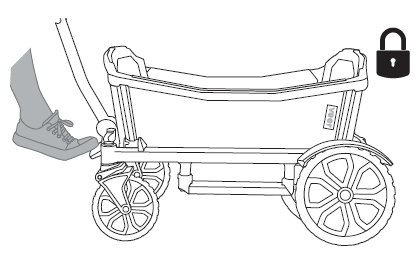
Lock the brake
Before installing the Comfort Seat, engage the Cruiser's brake to prevent the wagon from rolling during setup.
✓ Confirm the wagon does not move before proceeding.
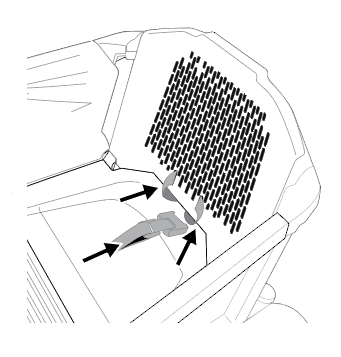
Gather harness behind seat back
Collect all harness straps and feed them behind the seat back so they are out of the way before inserting the seat into the Cruiser.
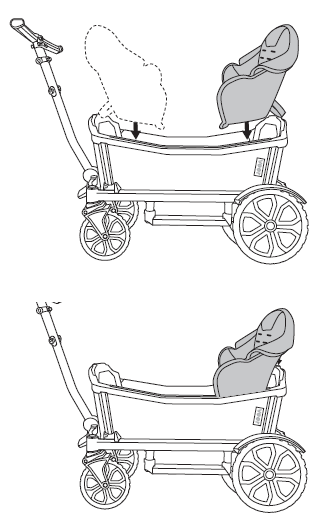
Insert seat & secure padding
Lower the seat into the Cruiser. Secure the back padding over the seat back and the side padding over the side rails.
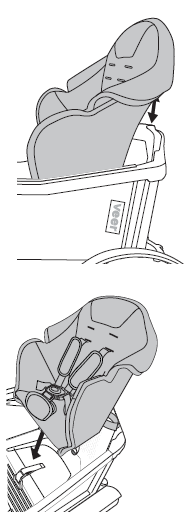
Insert seat fully
Press the seat down firmly until it sits flush and level inside the Cruiser.
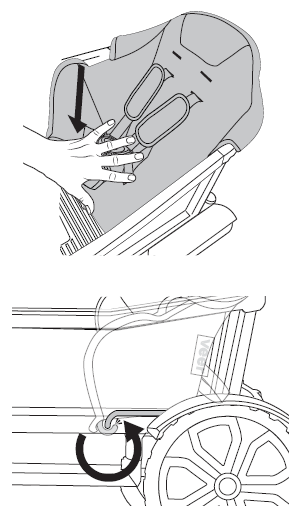
Secure seat — j-hook & rear straps
Push the seat bottom forward until the j-hook clips to the front edge of the seat and "snaps" into place.
Fasten the rear connection straps and back retention loop.
✓ Tug gently to confirm the j-hook is fully engaged.
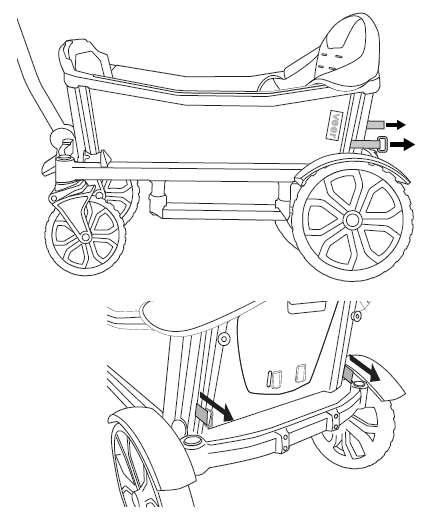
Secure seat — side connections
Connect and tighten all side attachment points as shown to stabilize the seat against the Cruiser frame.
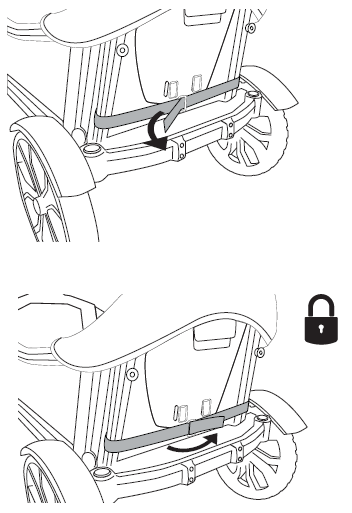
Secure seat — final check
Inspect all connection points. The seat should not shift or lift when gently tested from any direction.
✓ All locking devices must be fully engaged before placing a child in the seat.
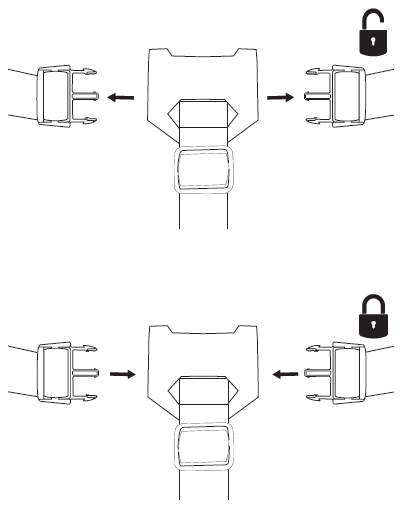
Thread the 3-point harness
Route the shoulder straps and crotch strap through the harness guides. Ensure each strap lies flat with no twists before buckling.
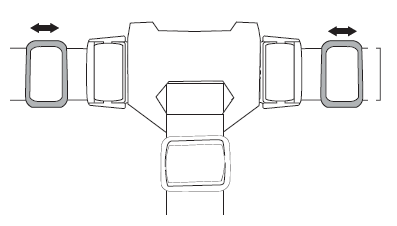
Buckle the 3-point harness
With your child seated, connect and tighten the 3-point harness. Always use the restraint system whenever a child is in the seat.
✓ You should be able to fit no more than two fingers between the harness and your child's chest.
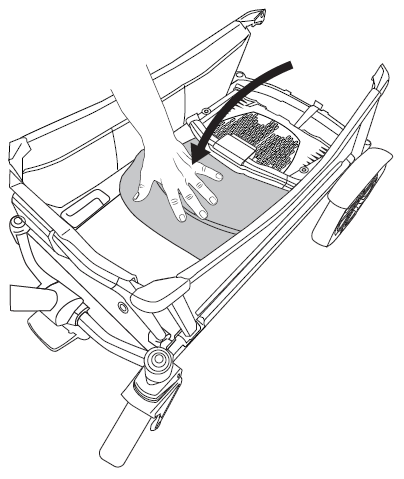
Release retention strap & fold
To fold the Cruiser, first release the back retention strap. Follow the Cruiser's folding instructions to collapse the wagon for transport or storage.
Always remove your child before folding the Cruiser.
Cleaning & general maintenance
+−
Routine cleaning
Rinse the area to be cleaned thoroughly with clean water. Using a mild detergent, sponge the area gently.
Deep cleaning
For a more thorough cleaning, remove the 5-point harness and internal seat structure and hand wash, then air dry.
Do not machine wash, tumble dry, bleach, iron, or dry clean.
Limited Warranty
+−
We've got you covered
This accessory is guaranteed to be free from any manufacturing defects for a period of 1 year from the date of purchase under normal use and in compliance with the operating instructions.
This warranty is not transferable and extends only to the original retail purchaser, and is only valid when supplied with proof of purchase.
Please retain proof of purchase to activate this limited warranty.
Coverage details
The warranty is valid only in the original country of purchase and is subject to the conditions set out by that country. Conditions may vary. Veer will not ship replacement or repair parts out of the country of purchase.
Veer will provide replacement parts or conduct repairs if deemed appropriate by the company. Veer reserves the right to exchange an item for a replacement part. Some parts may be replaced with newer model parts as the Cruiser is improved over time.
What's not covered
A repair issue will not be covered by this warranty if:
- The issue is caused by misuse or improper / poor maintenance.
- Damage is caused by improper installation of Veer parts and/or accessories.
- Damage is corrosion, mold, or rust caused by a lack of maintenance or service.
- Damage is due to general wear and tear from everyday use or negligence.
- Damage is caused by sun intensity, sweat, detergents, damp storage, or frequent washing.
- Repairs or modifications are carried out by a third party.
- Cruiser is purchased from an unauthorized retailer. Approved retailers are listed at goveer.com.
- Cruiser is second-hand.
- Cruiser is damaged as a result of an accident, airline, or freight damage.
Veer reserves the right to determine whether the terms and conditions of the warranty have been met. For full warranty details, visit goveer.com.
Need help? Email [email protected].